
Dealer network analytics
If you share products with dealers, their quote requests do not show up in your normal quotation list — they live in their own Dealers view. That view is a small dashboard: how many requests came in, how many dealers are actually active, and which dealer brings in the most work.
Where to find it
Manager → Quotations (Offertes).
The toolbar has a three-way view switcher on the right: List (Lijst), Kanban and Dealers. Choose Dealers.
| View | Shows |
|---|---|
| List (Lijst) | Your own quotations, as a sortable table. Quotations that belong to one of your dealers are left out. |
| Kanban | The same quotations as a pipeline board — see Quotes pipeline. |
| Dealers | Only the quotations of your dealers, with the KPIs and the chart described below. |
This split is deliberate: List and Kanban are your own funnel, Dealers is your network's. A quotation therefore appears in one of the two, never in both.
If you do not work with dealers, the Dealers view stays empty. Granting a dealer access to a product is done from the product itself — see Product configurations and Dealer editor.
Filter by period
In the toolbar is a date picker; its window has the presets 7d, 30d, 90d and All (Alles), or pick the first and last day in the calendar and click Apply (Toepassen). It opens on the last 30 days. The KPIs, the chart and the table below all follow the selected period.
The search bar works here too: the KPIs, the chart and the table then only count the quotations that match your search. Switching to Dealers clears any search you typed in another view.
What you see
| Block | What it tells you |
|---|---|
| Total requests (Totaal aanvragen) | Every dealer quotation created in the selected period. |
| Active dealers (Actieve dealers) | How many different dealers submitted at least one request in that period. Dealers with zero requests are not counted. |
| Quote requests per dealer (Offerteaanvragen per dealer) | A bar chart of the requests per dealer, highest first. Dealers without requests in the period are left out of the chart. |
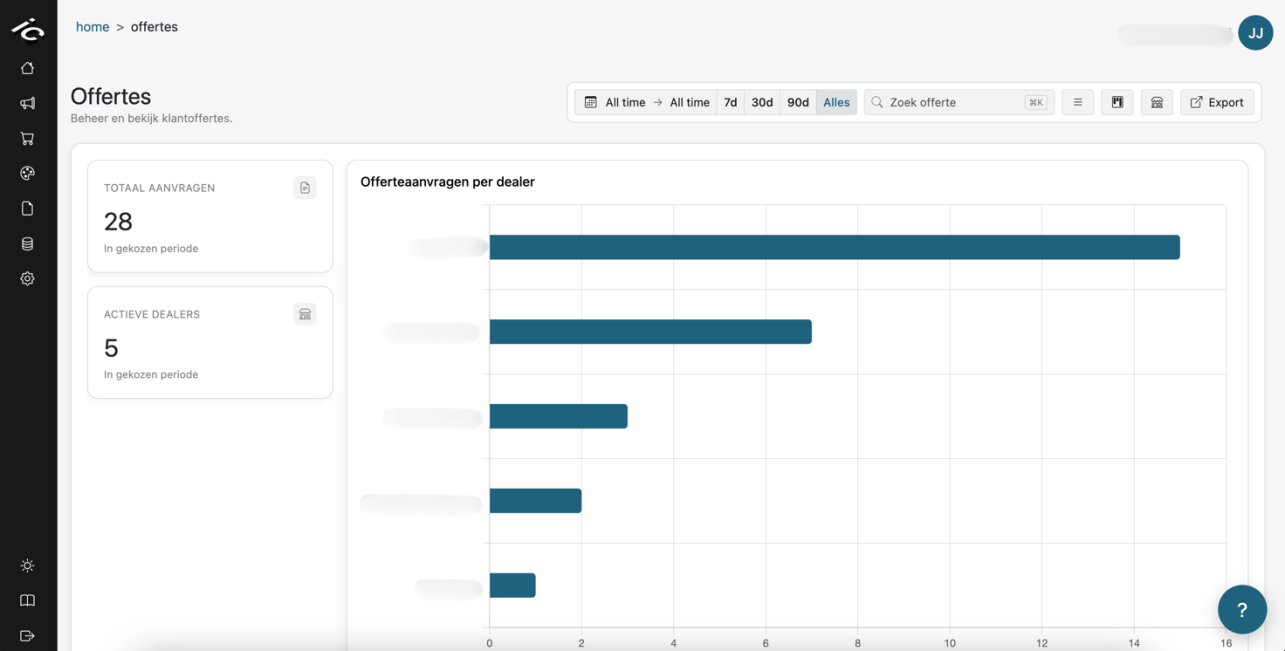
Below the dashboard is the familiar quotation table, now scoped to your dealers. Click a row to open it in the Quotation editor, exactly as in the List view.
Tips
- Compare Total requests with Active dealers: many requests from few dealers means your volume depends on a handful of partners.
- Switch between 30d and All to tell a dealer who has stopped from a dealer who was never active.
- The chart only shows dealers with requests in the period. A dealer you expect but do not see has submitted nothing — check whether they actually have access to the product.
- Need the underlying rows in a spreadsheet? Use Data → Export (or the Export button on the Quotations page); the quotation export includes the dealer.
Further reading
- Quotes pipeline — your own quotations as a board
- Quotation editor — open and edit a single quotation
- Dealer editor — how a dealer works on a shared product
- Marketing dashboard — how visitors use the configurator